
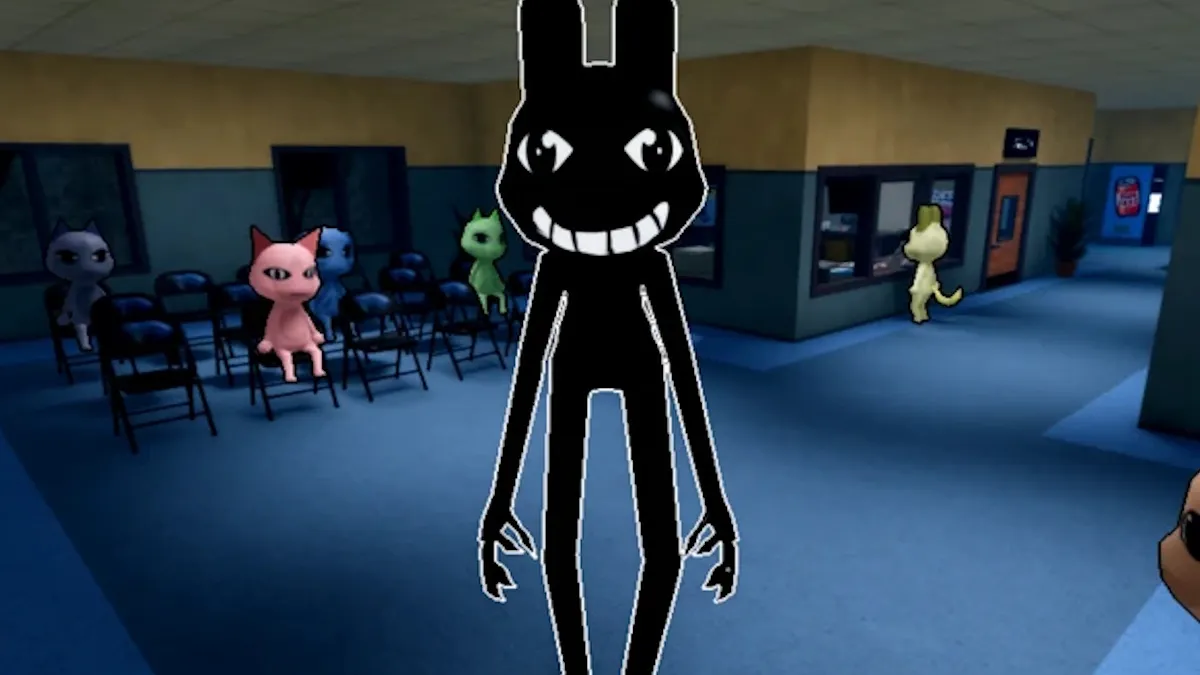
Animal Hospital’s most perilous foes arrive not as physical threats but as subtle yet unmistakable anomalies, capable of turning a calm day into chaos.
Latest Guide to Spotting Every Anomaly in Animal Hospital
In the Roblox title, anomalies manifest across three visibility layers: on‑site appearance, still photographs, and security camera feeds. Identification hinges on a trio of checks—watch, snap, and scrutinize—before the patient can walk through the doors.
1. Appearance‑Based Anomalies
- Twitching – Patients flicker the neck, limbs, or torso in brief bursts lasting four–five seconds. Observe before admitting.
- Three Eyes – A single red, luminous third eye, often layered over the natural pair, signals immediate rejection.
- Hollow Face – Empty eye sockets and a wide, pursed mouth give a ghostly look that should be denied.
- Wide Eyes and Creepy Smile – Exaggerated pupils combined with a fixed grin are hard to miss even from a distance.
- Human Teeth – Replacements of animal incisors with realistic human molars reveal a disconcerting abnormality.
- Mismatched Eyes and Sharp Teeth – A higher eyelid paired with razor‑sharp, glowing teeth, often with a head that follows the player’s motions.
2. Photo‑Based Anomalies
- Incorrect Photo – The captured image shows a different animal or coloration; dismiss instantly.
- Different Eyes – Subtle mismatches such as missing pupils or extra eyelids between the live animal and the photo.
- Different Ears – Variations in ear size, shape, or even species between the physical patient and the snapshot.
- Unnatural Photo – Distorted facial features or improbable smiles that appear only in the photograph.
- Static Photo – A thick layer of interference covers the image; if in doubt, keep the patient locked.
- Cursed Photo – Picking up an unfinished image drains sanity instantly; wait for full development.
3. Security‑Camera‑Only Anomalies
- Unnatural Body – The body elongates or scales in impossible proportions each time the feed is refreshed.
- Hollow Face (CCTV) – A spectral emptiness appears only through the lobby camera.
- Staring at Cameras – The patient’s gaze is fixed on the camera, neither turning toward the desk nor the viewer.
- Void Bodies – The silhouette becomes a black void, removing every detail.
- Mismatched Ears or Eyes – Slightly off angles between the reception view and the lobby camera expose this anomaly.
- Black/Censored Eyes – A dark band overlays the visage, yet realistic eyes peer through, visible only on the feed.
- Camera Twitching – Quick jerks appear exclusively in security footage, often missed unless the camera is left on longer.
- Disguised Shapeshifter/Skinwalker – Appears normal at counter but morphs to a monstrous form only after reaching the checked‑in zone.
4. Class‑Choice and Shift Survival
Choosing the right class—Surgeon, Nurse, or Technician—directly impacts detection speed and sanity loss. For example, Technicians can zoom on CCTV quicker, while Surgeons excel in spotting appearances like Twitching or Three Eyes. Each class also changes how many photo iterations the player requires before a patient can enter the bay.
5. Consequences of an Overture Failure
Allowing an anomaly in triggers a cascade of negative outcomes: sanitation levels drop, patient counts surge, or a Skinwalker may appear to attack other patients. Even mild sanity drain from a Cursed Photo can crash a shift’s efficiency, forcing rapid recross checks.
6. Hardest Anomaly to Detect
Testers identify Mismatched Ears or Eyes as the most elusive; differences can be minor enough that a casual glance conflates them with normal variation. The camera‑only traits—Camera Twitching and the Disguised Shapeshifter—are easy to overlook when a quick sweep of CCTV is skipped.
Ultimately, mastering the triad of checks—appearance, photo, and camera—transforms every Animal Hospital shift into a high‑precision operation where even the most cryptic anomaly can be spotted before it disrupts the hospital’s stability.
 "
"